Wednesday, November 28, 2007

PRIV1.HTML file in Exchange 2000


The question came today from one of my peer at work was asking a question about priv1.html file, when we are performing defrag on exchange 2000 databases. What is this file about I never know exchange would use HTML file as database. My peer knew the priv1.edb file and what it does very well; nevertheless, the HTML file seemed to him a bit abnormal.

Summary:

priv1.edb, but it also has an escort file called priv1.stm. (priv1.html), for some weird reason windows reads this file as HTML file (go figure), which confuses some of the exchange administrators.

  • Priv1.edb files contain Rich Text Formatted (RTF) content messages.
  • A priv1.stm file contains non-RTF messages.

The priv1.edb holds message data from messages that are in native MAPI format, the STM file holds content for internet formatted messages. Both are required to get the database to function correctly.

The 16-GB size limit for the Exchange private mailbox store database and the 16-GB size limit for the Exchange public mailbox store database is the sum of the size of both the Priv.edb and the Priv.stm files.


When you put a limit on a mailbox,

  • You only limit the storage in the Priv.edb file.
  • You do not limit the storage in the Priv.stm file.

For example, a mailbox may appear to use only 250 MB of space in Exchange System Manager. However, the total space that the mailbox uses may be 450 MB. This difference occurs because the 200 MB of space that the Priv.stm file uses does not appear in Exchange System Manager.


When you do a defrag of the edb, the stm file is automatically also defragged.

Best

Oz Ozugurlu

Tuesday, November 27, 2007

Event ID logs 445; Exchange databases reached the 16 GIG limits


Problem:

Exchange server 2000 is not accessible. Event ID logs 445; Exchange databases reached the 16 GIG limits. This will cause interruption on the mail flow.

Event Type: Warning

Event Source: ESE

Event Category: Space Management

Event ID: 445

Date: 11/27/2007

Time: 3:51:57 PM

User: N/A

Computer: CHALBIRFS0

Description:

Information Store (5640) The database E:\Exchsrvr\mdbdata\priv1.edb has reached its maximum size of 16383 MB. If the database cannot be restarted, an offline defragmentation may be performed to reduce its size.


Solution:

I would love to say here, upgrade to exchange 2007 if all it is possible, at least to Exchange 2003 to get the advantage of 75Gig limit in DB. In some cases, decision makers (Managers) are very none sense, to be honest. I have seen million of times so far same scenario. For technical people it is very frustrating to deal with manager who has no clue about current technology. Remember this is the way it is and we have to leave with this. Follow the step below

ESEUTIL /D is the immediate action we have to take in this particular issue. We bumped the DB size to 17GIG with following registry hack.

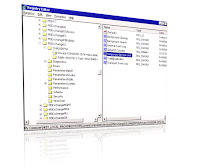
  • Click Start, click Run, and then type regedit.exe. Locate the following key in the registry: HKEY_LOCAL_MACHINE
  • SYSTEM
  • CurrentControlSet
  • Services
  • MSExchangeIS
  • Private

Right click, new Dword Value, and name it "Temporary DB Size Limit" and enter value 1.Restart information store service for changes to take effect. Requires Service Pack 3 for Exchange 2000 and the following registry entry:

The C drive was out of space therefore we need to perform the Defrag to E drive, where we had plenty of free space

C:\>"C:\Program Files\Exchsrvr\BIN\ESEUTIL.EXE" -d "E:\Program Files\Exchsrvr\MD BData\priv1.edb" /te:\temp.edb

This was the Temp file is going to be created on the E Drive. Many o f you know if already the story behind the temp database. Exchange will create an empty database in this example is the Temp database and will copy good mail data into this DB. When exchange is done, it will tell you "Hey I have created brad new database, go ahead delete the original one and use this one instead."

Determine White Space Event id 1221. If it is too late and exchange databases are dismounted due to space problem, use ESEUTIL /MS determine the white space.

Space Dump with ESEUTIL /MS to determine the space. Also ensure that you have 110% free disk space associated with the Exchange database size.

You can check the integrity of your Exchange database with ESEUTIL /G

After running ESEUTIL, check the log file called "integ.raw "to see the results.

Let's talk about ISINTEG in general (Isinteg -fix -test alltests)

ISINTEG is the only repair utility that understands the Exchange database as an Exchange database (taken from MS support)

  • Isinteg understands the relationships between those tables and records that turn them into folders and messages.
  • At the end of an Isinteg fix run, you will likely see hundreds to thousands of warnings, no worries, but we need to worry if there is even one error, and rerun the Isinteg until there is no more errors are being reported.
  • Before you do this make sure,
  • The information store service is running
  • The mailbox store is dismounted
  • Isinteg -ServerName –Fix –Test alltests

Here are the final Steps:

  • Run ESEUTIL /MS (determine the space, you won't be blind)
  • Run Eseutil /P ( Hard Repair)
  • Run Eseutil /D. ( Defrag)
  • RUN Isinteg -fix -test alltests (fixes the logical problems)

    Example: isinteg -pri -fix -test alltests


Best,

Oz ozugurlu


Sunday, November 18, 2007

Active directory windows 2008, Read only DC (Domain Controllers)


The security aspect is getting more and more integrated into windows 2008 servers. Therefore, if we examine the new futures in active directory we will quickly realize, the security focus around most of the directors and DNS services. The read only DC concept is brand new; it makes me remember UNIX concept. The out the box Windows servers seems to be more robust and contains more granular delegation of task, which can be delegated to administrators.

Below some of the highlights, I have observed and wanted to share with you all.

Administrator role separation

  • Read only domain controllers (RODC) in windows 2008. More secure deployment with read only DC.
  • This is great for sites, which do not have IT support. (Providing local services, Print service, logon service)

We are not exposing full writable domain controller in the remote site (RODC)

  • RODC stores copy of the DIT database, no security principle ( no passwords). If the RODC gets compromised the DIT, Database have no passwords in it.
  • If there I changes made at the site, this wont effect the corporate site, since the DIT is read only.

Management

  • Great improvement o the DCPROMO, ADUC Distributes files system replication (DFSR)
  • Administration roles separation
  • Delegation of DCPROMO and RODC (more granular control)

DNS Improvements

  • Backbone of AD is still DNS, and DNS have many improvements in windows 2008 AD.
  • DNS has new located Flag, (based on site cost).
  • Read –Only active directory integration zone for RODC

RODC (Read Only Domain Controller)

The DIT Database is read only. The changes must be done on the writable DC, such as password changes. RODC is primary targeted to remote sites and Edge offices. The security treads Each RODC has its own Kerberos ticketing system.

Deploying RODC Requirements

Windows 2003 forest functional mode or later, and one at least DC must be running windows 2008 server. Domain functional level must be raise to windows 2003 or later.

  • RODC needs to forward the logon request to windows 2008 server
  • One RODC per site is recommended
  • NO RODC to RODC Replication
  • No plans to support Exchange to support RODC / GC ( Global Catalog

Best,

Oz Ozugurlu

Friday, November 16, 2007

Exchange 2007 Versions and some of the futures

Exchange 2007 Standard

  • SG (Maximum of five storage groups)
  • DB (Maximum of five databases)
  • OA (Support for Outlook Anywhere) formerly known as RPC/HTTPS
  • LCR (Local continuous replication)
  • RGG (Recovery storage group)
  • Database size (No limit)
  • Exchange 2007 Standard

Exchange 2007 Enterprise

Support all futures as standard edition

  • Up to 50 SG
  • Up to 50 DB ( MS recommends one SG and one DB)
  • Why it is, recommended this way? Log files for Entire SG, if you have one SG,

    If we segregate the logs for one DB which will be better (faster) than writing logs to more than one DB

  • Consider using different spindles for best performance, even in 64Bit architecture, which is common sense.
  • SCC (single Cluster Copy)
  • LCR (Local continuous replication LCR supports 1 Database per Storage Group
  • CCR (Cluster continuous replication ) CCR only supports 1 Database per Storage Group

Coexistence Requirements

  • Exchange 5.5 is not supported. If you still have, it get rid of it.
  • All Exchange Server 2003 servers must have SP2 installed
  • All Exchange 2000 Server servers must have SP3 and post-SP3 update rollup installed

Best,

Oz ozugurlu