Saturday, April 16, 2011

Cannot remove Mail Box, receiving, Active Directory operation failed on VMdc2.smtp25.internal. This error is not retriable. Additional information: Access is denied.


Problem :

Unable to remove user mailbox, when you have sufficient enough rights.                                                                                    

Microsoft Exchange Error
Action 'Remove' could not be performed on object 'Jeff Bakin'.

Jeff Bakin                                                                             
Failed
Error:
Active Directory operation failed on VMdc2.smtp25.internal. This error is not retriable. Additional information: Access is denied.
Active directory response: 00000005: SecErr: DSID-031520B2, problem 4003 (INSUFF_ACCESS_RIGHTS), data 0

The user has insufficient access rights.

OK                                                                                         

image

Solution:

  • Log into your Domain controller and fallow the steps below
  • Click Start type ADUC.msc
  • On the View Click on Advance futures , click on object tab and clear the check mark where it says “Protect object from accidental deletion”
  • Try to delete again, you should be fine.

image

Respectfully,
Oz Casey, Dedeal

MVP Exchange Server
MCITP (EMA), MCITP (SA)
MCSE 2003, M+, S+, MCDST
Security+, Project +, Server +
http://smtp25.blogspot.com/ (Blog)
http://telnet25.wordpress.com/ (Blog)

Tuesday, April 12, 2011

Microsoft.PowerShell_profile.ps1 cannot be loaded….

If you have lunched PS and receiving fallowing  errors , here is quick tip how to fix it
Problem: After lunching PS , receiving errors as fallows , Microsoft.PowerShell_profile.ps1 cannot be loaded….
Solution: Open PS and insert fallowing PS commands
image
PS C:\Windows\System32> Get-ExecutionPolicy        
Run the below command with Elevated Privileges ( Administrator)
Set-Executionpolicy -ExecutionPolicy Unrestricted      
image
image
Get-ExecutionPolicy –List                            

imageRunning Scripts From Within Windows PowerShell
http://technet.microsoft.com/en-us/library/ee176949.aspx

Respectfully,
Oz Casey, Dedeal

MCITP (EMA), MCITP (SA)
MCSE 2003, M+, S+, MCDST
Security+, Project +, Server +
http://smtp25.blogspot.com/ (Blog)
http://telnet25.wordpress.com/(Blog)

Thursday, April 7, 2011

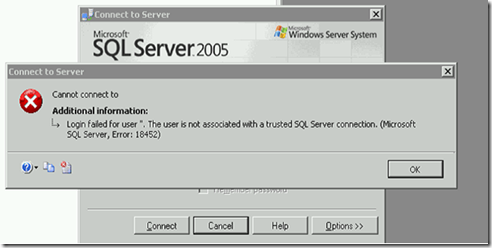
Login Failed for user The user associated with a trusted SQL Server connection ( Microsoft SQL Server Errors : 18452)


Issues: SP servers are recovering fallowing error “Login Failed for user The user associated with a trusted SQL Server connection ( Microsoft SQL Server Errors : 18452)”

Postmortem:

The SPN record in DNS for the Share point service account had issues, and for some reason the SP server could not get the SPN record for authentication thus below errors were generated.
 

image

Possible Solution: there might be multiple different scenarios why above generic event occurs the tools used in this example ( list is below) important to capture any authentication issues maybe causing problem.

Find out which DC is not honoring the mentioned SPN record. Run SSPIClient.exe and check the output see below

image

You may have to fire up ADSIedit and check the SPN entry for the SP service account , if you do remove the SPN entrees the authentications should fall back to NTLM and things should work fine. If so add the SPN value back and check to make sure the Domain controller SP is complaining about does have valid Kerberos and CName record, under DNS _msdtc . Remember these records are dynamically created records when DC reboots it registers these records into DNS database, so that DC can offer such services to its clients. Check TPC/IP configuration on the DC to make sure which DNS server the DC is configured to talk too. If DC is configured to point itself and running AD integrated DNS, try to point it to another DC on different  AD Site and FlushDNS and register via fallowing commands…….

  • IPconfig /FlushDNS
  • IPConfig /RegisterDNS
  • Also re-start Netlogon service on the domain controller and try to authenticate once more.

Tools used:
SSPIClient.exe:  Security Support Provider Interface.  Tracks the authentication process and generates a log.

Kerblist.exe: CLI tool.  Reset the Kerberos cache (purge) and list the cached Kerberos (tickets).   Reboot of any server effectively execute the purge on all servers.

Adsiedit.msc: Standard AD tool.  Used to edit the SPN record of svc-intra.sql account.

Eventlogs Windows standard tool for log analysis.
Network Monitor or NetMon: Capturing network packets on Windows platform (not used).

Respectfully,
Oz Casey, Dedeal

MVP Exchange Server
MCITP (EMA), MCITP (SA)
MCSE 2003, M+, S+, MCDST
Security+, Project +, Server +
http://smtp25.blogspot.com/ (Blog)
http://telnet25.wordpress.com/(Blog)

Monday, April 4, 2011

Rename Local Admin account and Reset password on your Domain.


Issue: Let’s suppose there has been some security concerns in your company and  you are asked to re-name local administrator account and change its password on all your workstation. We will get the work done VIA GPO.

Solution : Create GPO and apply to all workstation in your forest /Domain.

On the domain controller , click on start type gpmc.msc

image

Expand Group policy objects , new GPO and give it a name in this example we will use “Rename_Local_Admin_reset Password”

image

Click edit

image

  • User Configuration
  • Preferences
  • Control Panel

image

new local user  and modify the options the way you want it. We are updating existing local administrator account with our selection

image

Now apply the GPO to all computers

image

image

here is the result from local PC

Before GPO

image

After GPO

from workstation if you like to see the results right away

gpupdate /force

image

image

Respectfully,
Oz Casey, Dedeal

MVP Exchange Server
MCITP (EMA), MCITP (SA)
MCSE 2003, M+, S+, MCDST
Security+, Project +, Server +
http://smtp25.blogspot.com/ (Blog)
http://telnet25.wordpress.com/ (Blog)