You will remember the option “Forward all mail with unresolved recipients to host” option on Exchange 2003 on the SMTP virtual server properties. The propose of this configuration is most likely , sharing SMTP name space with another mailing system within your organization such as “ListServer” etc.
Now let’s remember what was SMTP name sharing briefly , you have Exchange server and your SMTP name space is @telnet25.org and you installed List server in your network because you wish to perform mass mailing and not wanting to use your Exchange server for this purpose while you will use same SMTP name space. Now you created mail address called marketing@telnet25.org on the ListServer, and you defined bunch of external mail addresses in there. Your ListServer has its own IP address when its sends mail out incase the IP getting in RBL list etc due to mass mailing.
here how it works
1. User A opens his outlook sends mail to “Marketing@telnet25.org” User A mailbox resides on E210 Server
2. E210 Receives mail goes trough the GAL and finds out the SMTP address “Marketing@telnet25.org” is NOT a valid recipient, E210 sees the matching “Send” connector with same SMTP address space and instead of bouncing mail back to sender it sends the smart host defied in the send connector, which is the IP address of the mass mailing system ( ListServer) in this case.
3.ListServer accepts mail and , markeing@telnet25.org is the group e-mail address and ListServer sends mail to each group member.

This is how it worked on if we were doing in on E03 server “Forward all mail with unresolved recipient to host”

now here are the steps to configure this on Exchange 2010 server, we will create convert our Authoritative domain to Internal Relay Domain,
***doing this is safe it does not effect your mail flow***


To see the accepted Domain from PS
Step1
| Get-AcceptedDomain | fl domainname, *type* |

Step2 ( Replace Telnet25.org------------>TO your own SMTP name space)
| Set-AcceptedDomain telnet25.org -DomainType InternalRelay |

Step3 ( Replace Telnet25.org------------>TO your own SMTP name space)
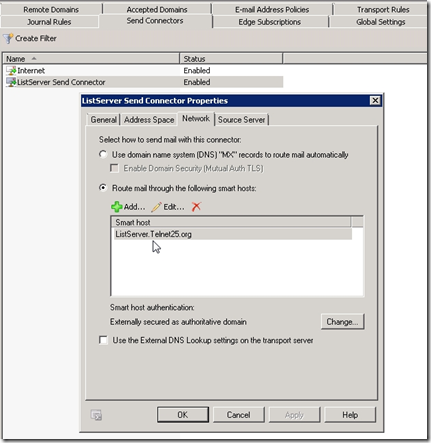
| New-SendConnector -Name "telnet25.org Send Connector" -Internet -AddressSpace telnet25.org -DNSRoutingEnabled $false -SmartHosts ListServer.telnet25.org -SmartHostAuthMechanism ExternalAuthoritative -MaxMessageSize 20MB |

- Now When you sent mail from E210 to non valid Recipient on GAL E210 will use the matching connector and send it to smart host defined in there which will be your list Server.
Notes:
If you have existing E03 Server , I recommend changing your mail flow, if your mail start bouncing ( inbound) with 5.7.1 unable to relay, on the E03 server , pass mail to E210 Servers and sent all out from E210 servers.

Understanding Accepted Domains
http://technet.microsoft.com/en-us/library/bb124423.aspx
Configure Exchange 2010 to Route Messages for a Shared Address Space
http://technet.microsoft.com/en-us/library/bb676395.aspx
Respectfully,
Oz Casey, Dedeal
MCITP (EMA), MCITP (SA)
MCSE 2003, M+, S+, MCDST
Security+, Project +, Server +
http://smtp25.blogspot.com/ (Blog
http://telnet25.spaces.live.com/ (Blog)
http://telnet25.wordpress.com/ (Blog)


![image[8]](https://blogger.googleusercontent.com/img/b/R29vZ2xl/AVvXsEjJa659L4g22J1yUXlZ8l7T3SuGpharRbmrtH4pFNZJKifz9R6KA1uiJ2a0bY3JN3i7PG7ADCKN9LIY_-WRsJ1MVeNrQN_xA017KGqpmzQDwqGNFrhgWpVQoFPAWc7VzIy8cgJpb_9uyt8/s1600-h/image%5B8%5D%5B3%5D.png "image[8]")


![ScreenShot003[3]](https://blogger.googleusercontent.com/img/b/R29vZ2xl/AVvXsEhhfCoZRbhgZbkbXg0gdRLu10OEXbwb55Jply8NnpYptV-DMhYI2PepEf6s0fegKKDN7_erfa-U-UWmhREc6AXTuTibtAIUwpUe80w6us0MQM4lufLB7it40wu9DwywGib4vA135q26wjo/s1600-h/ScreenShot003%5B3%5D%5B3%5D.jpg "ScreenShot003[3]")


